dB music silence trimmer icon
roger DJ oddBeat

dB music
silence trimmer

v1.0.4 · 7-day trial · 15€

dead air at the top and tail of a track wastes deck time and softens your intros. silence trimmer finds it and cuts it clean — losslessly, no re-encode — and hands you a waveform editor when you want to trim by ear.

download
macOS · apple silicon · notarized
Opening it the first time on macOS

macOS checks apps from outside the App Store on first launch. If you see “Apple could not verify… is free of malware”, don’t worry — the app is signed & notarized by Apple. To open it:

  1. Click Done — never “Move to Bin”.
  2. Open System Settings → Privacy & Security.
  3. Scroll down and click Open Anyway next to “dB music silence trimmer”, then confirm.

You only do this once — after that it opens like any other app.
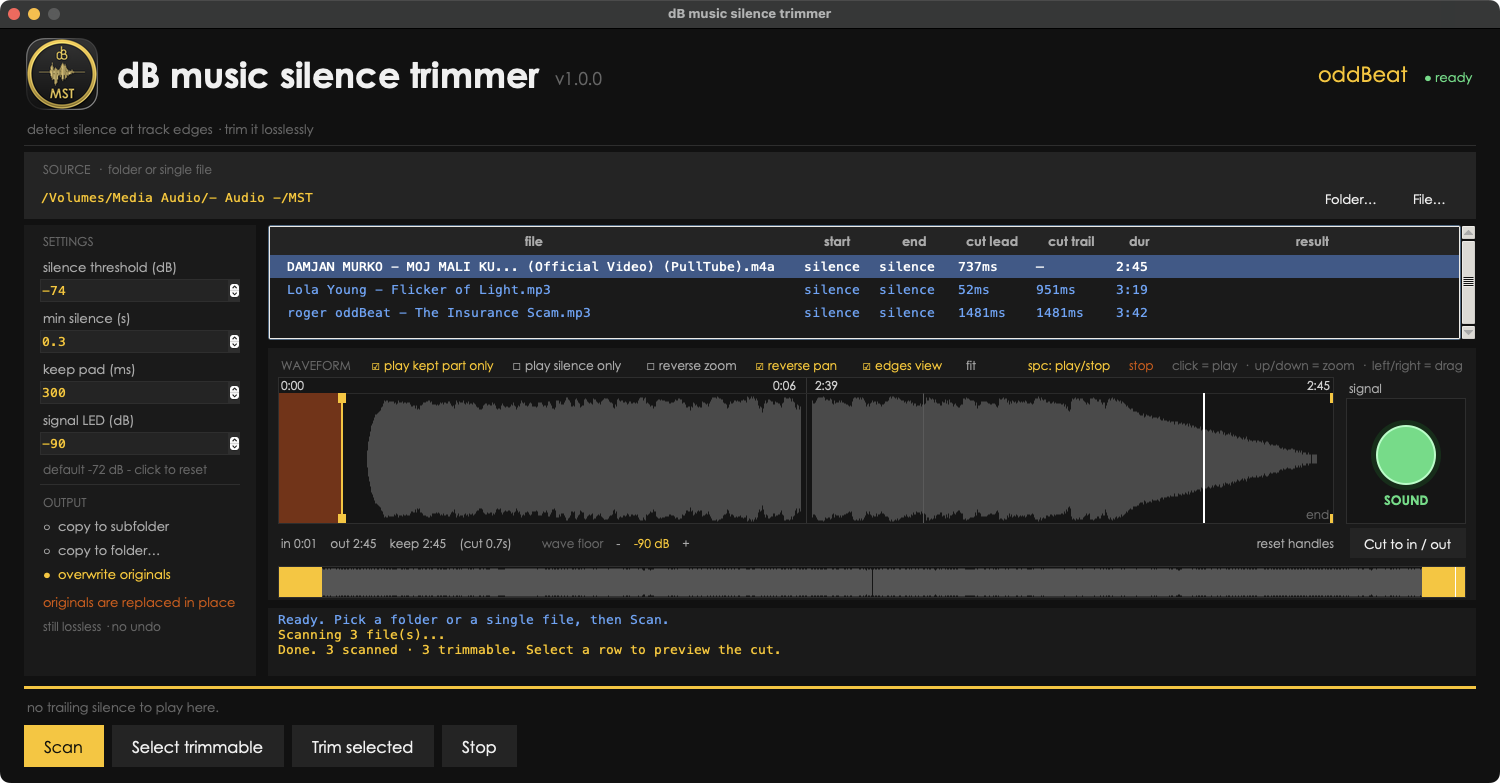
dB music silence trimmer app window

Traktor DJs: trimming the end of a track is always safe. trimming the start shifts its beatgrid and cues — so trim before you grid, or stick to end-only on already-gridded tracks.

what it does

trims dead air, losslessly

auto-detects the silence at the start and end of every track and cuts it without re-encoding — MP3 by frame-copy, WAV/FLAC/AIFF/M4A by stream-copy. the audio is bit-for-bit identical, just shorter.

🎧

waveform editor

a zoomable full-track waveform with draggable in/out handles for precise manual cuts — ideal for tightening a YouTube rip or an intro/outro exactly where you want it, by ear.

📁

batch a whole folder

scan a folder, see how much silence each track carries, and trim them all at once. safe output modes: a new subfolder, a separate folder, or in-place — every one of them lossless.

why this exists

a track shouldn’t open with two seconds of nothing.
ripped files and exports carry dead air at both ends —
right where a tight intro should be.

silence trimmer measures the real start and end of the sound, trims to it, and never touches a single audio frame in between. you hear exactly what you had — only without the gap.

three steps
1

point

drop in a single file or point it at a folder — it scans each track and measures the silence at both ends.

2

preview

see the waveform with the auto-detected trim points, listen from any spot, and nudge the in/out handles if you want a different cut.

3

trim

lossless cut, one track or the whole batch — keep the originals in a new folder, or overwrite in place (still no re-encode).

always lossless

silence trimmer never re-encodes your audio. MP3s are cut on frame boundaries by frame-copy; WAV, FLAC, AIFF and M4A are stream-copied. the trimmed file carries the exact same bitrate, codec and quality as the original — it is simply shorter.